ShiftArp
Version 1.3.0
ShiftArp is a shift-register arpeggiator inspired by the Flatsix Arp of Darkness. Instead of arpeggiating a predefined chord, ShiftArp builds its own sequence from notes you feed in live through the CV/gate inputs or hand-edited in a modal buffer editor. Those notes sit in a FIFO buffer of adjustable length (3..16 notes), and the applet plays them back in one of ten modes — from simple forward/back through Golden Ratio to Shuffle, Pedal Point, and a shifting window. A built-in per-applet quantizer (independent from the global Hemisphere scale engine) shapes the output through scale, root, octave shift, and a per-degree mask — all stored per-preset together with the buffer.
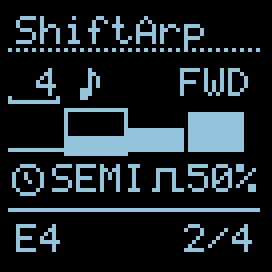
I/O
| 1/3 | 2/4 | |
|---|---|---|
| TRIG | Clock — advance the playhead by one step | Reset the playhead to the first position |
| CV INs | Pitch source (quantised to semitones on capture) | Capture gate — rising edge pushes CV1 into the buffer |
| OUTs | Pitch (V/oct, after scale quantiser) | Gate pulse (length = Gate %) |
UI Parameters
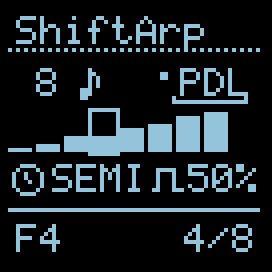
- Length — how many notes of the buffer take part in playback, 3..16. Buffer physically holds 16 slots; this value is the active window. Right-aligned in the top-left field.
- Edit (note icon) — opens a modal buffer editor (see Buffer editor below).
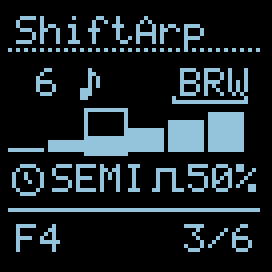
- Mode — playback pattern (10 options, see below). Shown as 3-char uppercase label in the top row, right-aligned to the side edge.
- Apply —
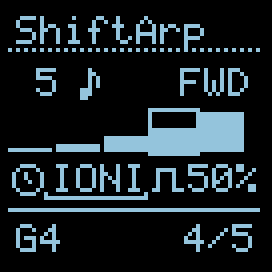
Imm(zap) applies Length/Mode changes immediately,Qd(clock) queues them until the start of the next cycle. - Scale — 4-character label of the active local scale. A click opens ShiftArp’s own modal scale editor (see Scale editor below). Default is
SEMI(chromatic, pass-through). The local scale/root/octave/mask state is per-preset and independent from any other applet on the same side. - Gt.len — gate pulse length, 1..99 % of the clock period (10 ms minimum floor).
Cursor order: Length → Edit → Mode → Apply → Scale → Gt.len.
| Cursor on Mode | Cursor on Scale |
|---|---|
 |  |
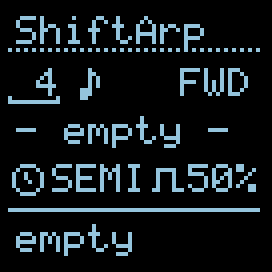
When the buffer hasn’t captured anything yet, the bar-graph row reads - empty - and the status row shows empty in place of a step counter:
Playback Modes
Ordered by “increasing freedom”: Direction → Patterned → Generative.
Direction — linear traversals, fully deterministic and predictable:
| Label | Description |
|---|---|
| FWD | Forward — oldest captured note first, advance to the newest, then loop |
| BCK | Backward — newest first, descend to the oldest, then loop |
| PND | Pendulum — forward then backward, endpoints play once (per Metropolix) |
| PPG | Ping Pong — forward then backward, endpoints repeat (per Metropolix) |
Patterned — non-linear motion, but still deterministic:
| Label | Description |
|---|---|
| PDL | Pedal Point — the oldest note as pedal against ascending others: 0,1,0,2,0,3,… |
| WIN | Shift Window (size 3) — 012, 123, 234, … sliding 3-note window (Metropolix Arp 3) |
| PHI | Golden ratio — Weyl sequence, evenly distributed but non-linear |
Generative — increasing entropy in the moment:
| Label | Description |
|---|---|
| SHF | Shuffle — one random permutation of the buffer, replayed cyclically until RESET |
| BRW | Brownian drunken walk — 50% forward / 25% stay / 25% back (per Metropolix) |
| RND | Random — any buffer slot on every step |
Buffer order. When you capture, the oldest note sits at position 1, newest at position N (FIFO). Forward plays them in entry order (what you played is what you hear). Backward inverts.
Golden ratio (PHI). Next index ≈ (step × ⌈N·0.618⌉) mod N. The jump is co-prime to N for most sizes, so every slot is visited, but the order feels organic — neither linear nor random. Signature mode of the original Arp of Darkness.
Pedal Point (PDL). The oldest captured note becomes a “pedal” — it plays on every odd step. Even steps walk through the remaining notes in order: 0, 1, 0, 2, 0, 3, …, 0, N-1. Classic organ-pedal sound, works especially well with long buffers.
Brownian (BRW). A drunken walk with 50 / 25 / 25 probability (forward / stay / back). Gentler and more musical than pure RND — the sequence drifts forward but occasionally revisits or backtracks. State is reset on every RESET trigger.
Shuffle (SHF). On the first playback pass after RESET (or a change in N), the applet generates a random permutation of 0..N-1 and plays through it. Subsequent passes repeat the same order — like shuffling a deck of cards and dealing them out again. Send RESET to reshuffle. Different from RND: RND is a dice roll on every step, SHF is one shuffle replayed.
Shift Window (WIN). A 3-note window slides across the buffer: 012, 123, 234, …, one index per step. Each window plays out fully before the window advances by one slot. With a buffer of 8 notes you get: 0,1,2, 1,2,3, 2,3,4, 3,4,5, 4,5,6, 5,6,7, 6,7,0(wrap), 7,0,1, …. Signature-feel for shift-register arpeggiators.
Capturing notes
When CV2 crosses ~2.0 V (rising edge with Schmitt hysteresis to reject noise), the applet waits ~5 ms for CV1 to settle, then reads and quantises it to the nearest semitone, pushing the result into the buffer head. The buffer is a classic FIFO — once full, the oldest note is dropped to make room.
Typical patch: V/Gate from a keyboard, sequencer, or quantiser feeds CV1 and CV2. Every new note played gets recorded; the arp is always the last N notes you touched.
Buffer visualisation
Row 2 of the screen shows a tiny bar graph of the active buffer window. Heights are normalised to the min/max of the current content (so small pitch differences are visible). The bar under the playhead is framed.
Local quantizer (per-applet, per-preset)
ShiftArp keeps its own quantizer instance per side, separate from the global Hemisphere q_engine[]. Scale, root, octave shift, and the per-degree mask all live in the preset payload — saved and restored together with the buffer. Changing the scale here doesn’t affect any other applet on the same side.
The buffer stores raw chromatic MIDI notes (0..127). On every clock the current slot is passed through the local quantizer (scale + root + mask) and then octave-shifted before reaching OUT A.
Scale editor
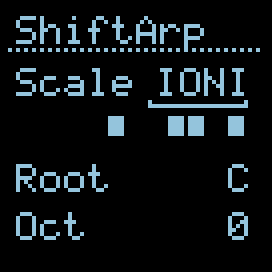
Navigate the cursor to the Scale field and press the encoder. A modal scale editor takes over the applet side. Cursor positions in order:
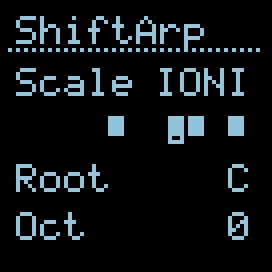
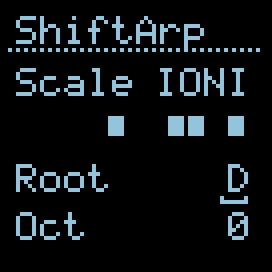
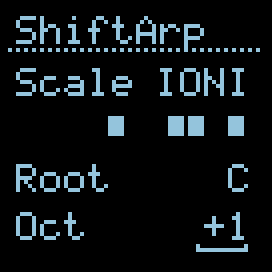
Scale → Mask bit 1 → Mask bit 2 → … → Mask bit N → Root → Oct
(N = number of degrees in the active scale, e.g. 12 for SEMI, 7 for IONIA.)
| Cursor on Scale | Cursor on a Mask bit |
|---|---|
 |  |
| Cursor on Root | Cursor on Oct |
 |  |
| Field | NAV behaviour | EDIT / click behaviour |
|---|---|---|
| Scale | Cursor blink-underline beneath name | Click → enter EDIT, encoder picks scale (no wrap, 0..NUM-1) |
| Mask | Cursor highlights one cell | Click directly toggles the cell (no NAV→EDIT step). Last enabled bit can’t be turned off (would silence playback). |
| Root | Underline beneath root name | Click → EDIT, encoder rolls C..B (cyclic) |
| Oct | Underline beneath signed value | Click → EDIT, encoder shifts -3..+3 octaves |
Mask cells: filled square = degree enabled, empty = disabled.
When the scale changes, the mask cell count adapts (number of degrees), and the cursor clamps to the last valid position so it never falls off the end.
Exit the editor: press the side button on this hemisphere (the same one that normally toggles select-mode). It routes through AuxButton() and closes the modal cleanly — no timing involved.
Buffer editor
Navigate the cursor to the Edit (note icon) field and press the encoder to open a modal buffer editor that takes over the applet side. Two sub-modes:
- NAV (↔ icon in the header) — encoder moves the cursor between slots (wraps).
- PITCH (pencil icon in the header) — encoder changes the pitch of the current slot in chromatic semitones. Turning down past
C-1(MIDI 0) makes the slot a rest.
| NAV — ↔ icon | PITCH — pencil icon |
|---|---|
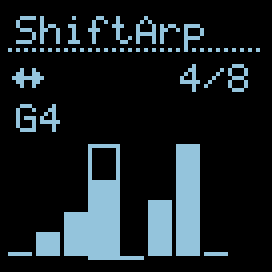 | 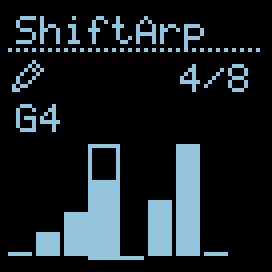 |
Single click toggles NAV ↔ PITCH. Side button exits the editor cleanly (AuxButton route). Double click anywhere wipes the buffer and closes the editor.
The editor draws all Length slots as bars. Bar heights are normalised to the min/max of active (non-rest) notes — same trick as the main view’s buffer visualisation, so small intervals stay visible.
| Mark | Meaning |
|---|---|
| Tall bar (any height) | Active note — relative pitch within the buffer’s range |
| Thin line at the bottom | Rest — slot exists but plays no gate |
| Single dot in the middle | Inactive slot — nothing recorded yet (i ≥ buf_count) |
| Frame around a slot | Cursor — currently selected slot |
Header shows the mode icon (left) and slot index i/L (right-aligned). The line below the header shows the current slot’s note name (C4, D#5…), - rest -, or - empty - for inactive slots.
| Cursor on a rest slot | Cursor past buf_count (inactive slot) |
|---|---|
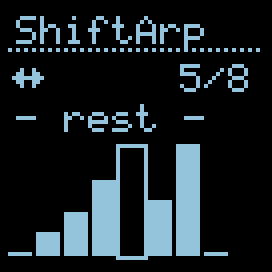 | 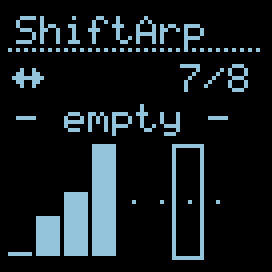 |
Lazy expansion. Opening the editor does not change playback — buf_count stays as it was. If you start editing a slot beyond the current buf_count (i.e. beyond what was captured), the buffer expands: gaps fill with rest, and buf_count jumps to include the slot you just touched. This makes the editor work both for “tweak captured notes” and “compose from scratch” without the playback length suddenly stretching.
Capture vs manual editing. The CV2 capture continues to work while the editor is open and afterwards. If you want to compose without interference, disconnect or stop the CV2 source — otherwise incoming captures will overwrite your manual edits.
Reset & clear
- DIG2 (Reset) — returns the playhead to position 1 on the next clock. Always immediate — the Apply switch does not affect it (you control the timing yourself by when you send the trigger). Also rewinds the Brownian walker and re-shuffles SHF with a fresh random permutation.
- Double-click the encoder (within 480 ms) — clears the buffer. Status row shows
emptyuntil the first capture. - Reset via Hemisphere global
auto_reset(e.g. starting the internal BPM clock) — also pulls the playhead back to 1.
Apply mode
Changes to Length and Mode can be either immediate or queued:
- Zap icon
Imm— the change takes effect on the next clock. - Clock icon
Qd— the change is held until the playhead wraps past the last step of the current cycle; a small dot appears next to the pending parameter to indicate something is queued.
Handy for live play: set Qd, dial in a new mode mid-cycle, hear it slot in cleanly at the bar line.
Persistence
When a Hemisphere preset is saved, ShiftArp now stores everything that defines the sound: length, mode, gate %, apply mode, buf_count, the entire 16-slot note buffer (including rest slots), and the local quantizer state (scale, root, octave shift, mask). Brownian walker position and Shuffle permutation are intentionally not persisted — they reseed on every load to keep generative modes fresh.
The buffer (16 × 8 bits = 128 bits) lives in two extra payload slots provided by the new Hemisphere extra-slots API (ExtraSlots() = 2). All other state fits in the standard 64-bit base payload.
Old presets. Presets saved by v1.0.x..v1.2.x don’t carry the buffer or the local quantizer state. On load they’re treated as defaults (SEMI scale, C root, 0 octave, all-on mask, empty buffer). Re-save the preset after upgrade to capture the current state going forward.
Length-bit fix history. v1.0.0 stored
Length=16in only 4 bits and silently truncated to 3 on reload. Fixed in v1.2.0 by widening to 5 bits — pre-fix presets re-load with shifted values, also fixed by re-saving.
Status row
The bottom of the screen shows:
- Current playing note (MIDI note name, after scale quantisation — matches what is coming out of OUT A).
- Step counter
idx / Nright-aligned. - When the buffer is empty: the word
empty.
Credits
Inspired by Flatsix’s Arp of Darkness. Shift-register concept, 6 original playback modes (including Golden Ratio), and buffer lengths 3..16 are taken directly from the original. PDL / BRW / SHF / WIN modes come from Intellijel Metropolix v1.4 (Pedal Point, Brownian, Shuffle, Arp N Shift). Gate-capture via CV, the modal buffer editor, the per-applet local quantizer with per-preset persistence, and the immediate/queued Apply switch are ShiftArp’s own adaptations for the Hemisphere form factor.
Adapted to Hemisphere by Victor Kuznetsov for O_C-Phazerville.