Metronome
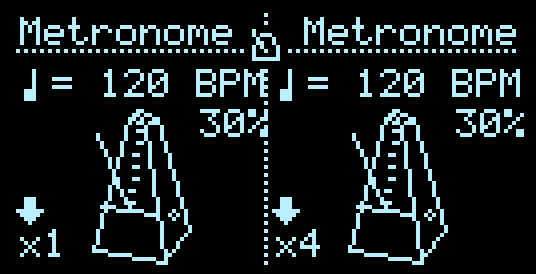
Metronome is a simple tempo control & visualizer for the Hemisphere internal clock. The first output is a multiplication or division configured in the Clock Setup menu (press UP + DOWN, or A + B buttons simultaneously). The second output is a constant Beat pulse, aka x1 or 1ppqn.
You can use this applet to modulate Tempo or Swing with CV.
If the clock is running, you’ll see a small metronome icon on the main screen header. To arm, start or stop the clock, long-press the left encoder button (or press the middle Z or VOR button on applicable hardware). This functionality is global to Hemispheres, and does not require the Metronome applet to be loaded.
I/O
| 1/3 | 2/4 | |
|---|---|---|
| TRIG | N/A | N/A |
| CV INs | Tempo | Swing |
| OUTs | Multiplied clock trigger | Beat clock trigger (x1) |
UI Controls
- Push Encoder: toggle between Tempo and Multiplier
- Rotate Encoder: Adjust the Tempo of the internal clock, or the Multiplier