MIDI Maps
New in v1.10! This full-screen page in the config menu shows you all the mappings for global MIDI Input sources in one place and allows you to edit them.
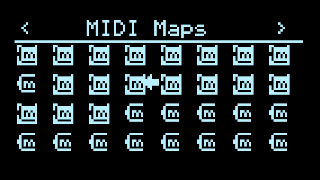
Each of the 32 icons shows whether that MIDI Map is already configured (inverted icon) and, if so, a thin vertical meter indicating signal level. Selecting one with the RIGHT Encoder displays a popup editor, very similar to the Q-engine popup editor:
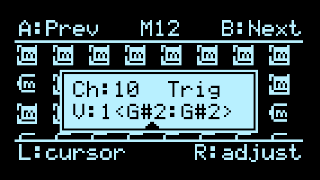
- LEFT Encoder moves the cursor
- RIGHT Encoder edits the value at the cursor
- A and B jump to the previous/next MIDI Map slot
- (TODO: Z for auto-learn…)
- Push either encoder or any other button to exit
Check the MIDI Input applet docs for more info about the options available in the popup editor, used to filter incoming MIDI traffic.