CVSeq
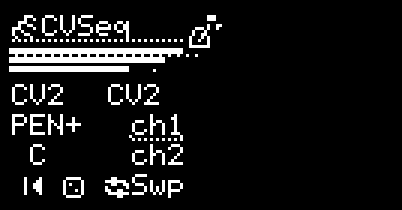
CVSeq is a clocked dual-channel CV/note sequencer with a shared pool of 32 CV values. Each channel has its own step list; each step picks a value from the pool and lasts a configurable number of clocks (with a half-clock option for ratchets/swing). Output 1 plays channel 1 (quantized, with optional CV1/CV2 transpose); Output 2 can play channel 2 or mirror channel 1 at various octave offsets. Both channels have independent loop regions, toggleable on the fly.
I/O
| 1/3 | 2/4 | |
|---|---|---|
| TRIG | Clock (timebase) | Reset |
| CV INs | CV1 (transpose / pitch base for channel 1) | Per In2 mode (CV2 input or CV1 transpose) |
| OUTs | Channel 1 CV (quantized) | Per Out2 mode |
Screens
The cursor traverses four screens in order: Main (modes, quantizer, transpose, reset/random, loop toggles), Values (edit the shared CV pool), Channel (per-channel step editor), General (CH1↔CH2 copy). A header on every screen shows both channel playhead positions and a 4-clock bar counter (one tick per half-clock, dotted at each whole clock); channel bars scale to Num steps and pin to full when a loop pulls playback past that length.
Pressing AUX while on most editable fields (CV/Note on Values; Num steps/Step/Value/Loop/Clocks on Channel) toggles a quick mode that scrubs the index without leaving the field.
In2 (CV2 input) modes
| Mode | Description |
|---|---|
| CV2 | CV2 is the pitch base for channel 2 (added before the channel 2 sequence value, then quantized). |
| Trnsp | CV2 transposes channel 1 in semitones. See Quantizer & transpose for Deg/Root behaviour. |
Out2 modes
| Out2 Mode | Description |
|---|---|
| CV2 | Channel 2 sequencer output (quantized, using CV2 as pitch base when In2 = CV2) |
| CV1±2 / CV1±1 / CV1 | Channel 1 output, transposed by ±2 / ±1 / 0 octaves |
| Gate | Short gate at each new channel 1 step |
| CV1in | CV1 input passed through (unquantized, not transposed) |
Quantizer & transpose
Both channels share one quantizer (Q1–Q8), with an OFF setting one click below Q1 that bypasses quantization (CV1/CV2, sequence values, and transpose are summed and output chromatically). The quantizer field shows the current scale and root; pressing AUX on it opens the global quantizer editor for that channel (works in OFF mode too, so you can prep before switching back).
The transpose-mode toggle controls how CV1-transpose (and the manual root note when no scale is selected) is applied:
Deg: added before quantization, snapping to a scale degree.Root: added after quantization, staying chromatic (manual root-note offset, matching TB3PO).
Values screen
The shared pool holds 32 CV values, indexed 1–32. Each step on either channel points at one of these; editing a value changes every step that references it.
- Value index — selects which value (1–32) to edit.
- CV — value as voltage. Each increment is half a semitone (50¢, ~0.042 V), giving a ±63.5-semitone range.
- Note — same value as a chromatic note name + octave (signed, e.g.
B-1). Odd values append+50cto indicate a quarter-tone — useful as a chromatic detune that survives quantization. - 0 / Cpy / Past — reset the current value to 0 V, copy to clipboard, paste from clipboard.
Channel screen
Per-channel step editor.
- CH — selects channel 1 or 2. Pressing AUX here toggles channel-follow: the step cursor tracks live playback (channel label highlights when active).
- Num steps — active sequence length (1–64). Steps beyond this are kept in memory but ignored unless a loop pulls them in.
- Step (#) — which step you’re editing.
- Value (val #) — index into the shared CV pool (1–32).
- Loop — region bounded by
>(lower) and<(higher) markers. Pressing the encoder snaps the closer marker onto the current step: extends the region from outside, contracts the nearer side from inside, collapses to a single step when on a marker. Markers can land anywhere from 1 to 64. - Clocks — step length. 32 values: a half-clock
1/2for ratchets/swing, then 1–31 whole clocks. Pairs of consecutive1/2steps fit inside a single clock; a trailing odd1/2run is auto-extended so the next step starts on a clock boundary. - Bottom row — total length of the active sequence (whole clocks), then when the current step starts. A trailing
/means a half-clock boundary (e.g.5/is five-and-a-half clocks in);-means the step is pastnum_steps.
General screen
CH1 > CH2: copy channel 1 (steps, length, loop) onto channel 2.CH2 > CH1: copy channel 2 onto channel 1.
Loops
Each channel has an independent loop region. On the main screen, ch1 / ch2 toggle the loop for that channel; Flp toggles both at once (useful for swapping which channel is looping).
Loop changes are clock-locked — they take effect on the next whole clock so swaps stay musical. Toggling again before the next clock cancels the pending change; editing the endpoints re-anchors the phase reference; a reset applies the current state immediately and clears any pending toggle.
- Engaging from outside the region: snaps to the position the loop would be playing if it had been running since reset (phase-locked re-entry).
- Engaging from inside: leaves the playhead where it is.
- Disengaging: continues from where the un-looped sequence would have been (the loop is treated as a detour, not a reset).
Random
Selecting Random on the main page opens a checklist-style randomizer:
CH1/CH2: per-channel checkboxes — only checked channels are affected bySteps(Init/Zeroalways reset both).Values: randomize the entire CV pool within ±18 semitones (whole semitones).Transpose: randomly transpose ~half of the CV values up or down by up to 6 semitones.Steps: regenerate the step list for each enabled channel with random clocks-per-step (mostly 4, some 2) and random value indices. CH1 targets 16 clocks (occasionally 8 or 32); CH2 is the same, half, or a quarter. Loops are cleared.Zero: clear all CV values to 0, reset both channels to a single empty step, clear loops.Init: load the default init sequence (root / 4th / 5th–driving techno pattern, CH1 = 3 steps, CH2 = 2 steps), and refill the CV pool with that interval set.Back: exit without changes.
Reset
Resetting (digital 2 trigger or pressing Reset on the main page) is latched: the current step keeps playing until the next whole clock, then both channels jump back to step 0. This keeps Reset musical when fired off-grid.
Persistence
⚠️ Step data is not saved across power cycles. Saved presets store only configuration (In2/Out2 modes, quantizer selection including
OFF, transpose mode, random checkbox state). The CV pool, step list, sequence lengths, and loop points all reset to the default Init pattern on power-up or preset reload.
Credits
Authored by Daniel Gorgan